
Repeat requests
The same documents are found, attached and emailed again and again.
B2B customer self-service for existing ERP & back-office systems
InvoicePortalX gives business customers secure access to invoices, statements, balances and related account documents. It works alongside the systems you already use as a managed customer-facing layer.
For wholesalers, distributors, trade suppliers and businesses running established back-office systems.
Read-only to your source system by default
The admin problem
When customers need an invoice copy, statement, balance or delivery document, somebody in finance or customer service stops to retrieve and resend it. InvoicePortalX gives repeat business accounts a controlled place to find available information themselves.
The same documents are found, attached and emailed again and again.
Multiple contacts, branches and sites make the right access difficult to manage manually.
The ERP works inside the business but offers limited or impractical customer access.
Keep the ERP
Your ERP or back-office system remains authoritative. InvoicePortalX receives and presents the configured account information without changing the underlying system.
Source system remains authoritative. No ERP write-back by default.
Portal experience
See how customers find account information and documents, while your team manages access, portal administration and branding. All screens use demonstration data.
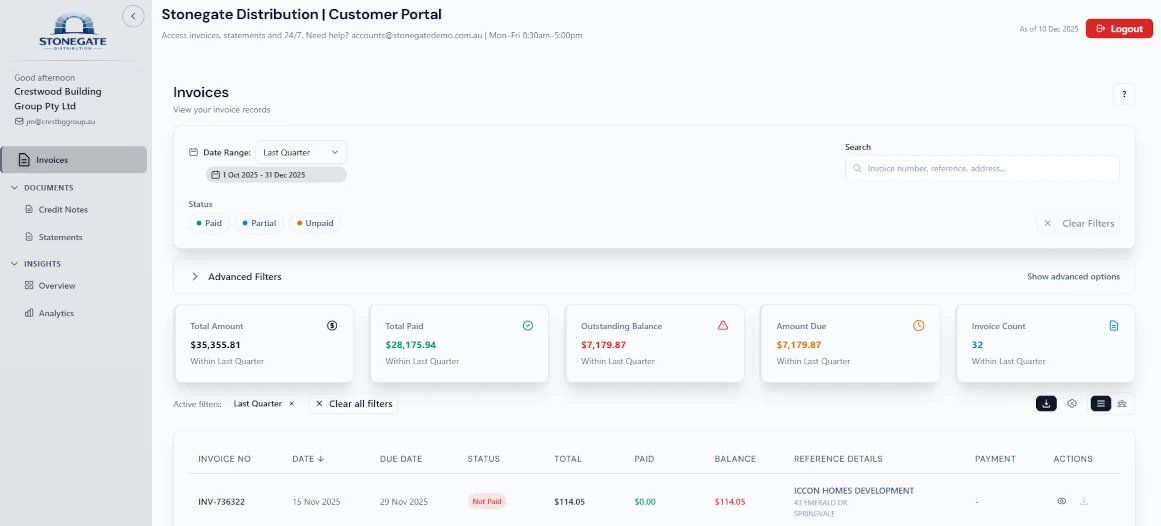
Give authorised customers one place to view invoices, balances and available account records.
Help customers find and download available documents without asking your team to resend them.
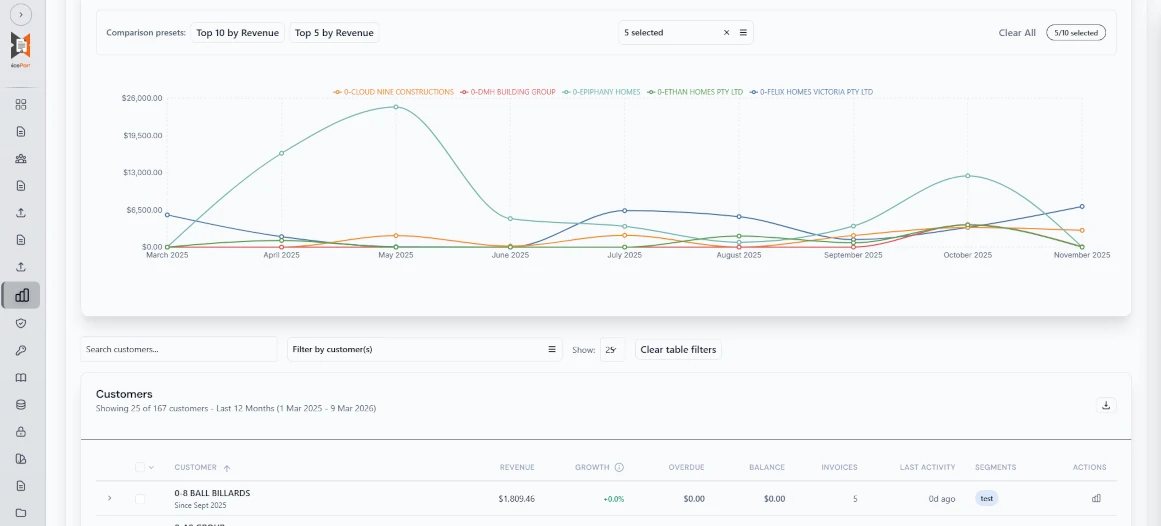
Review imported information, manage customer access and keep an administrative activity history.
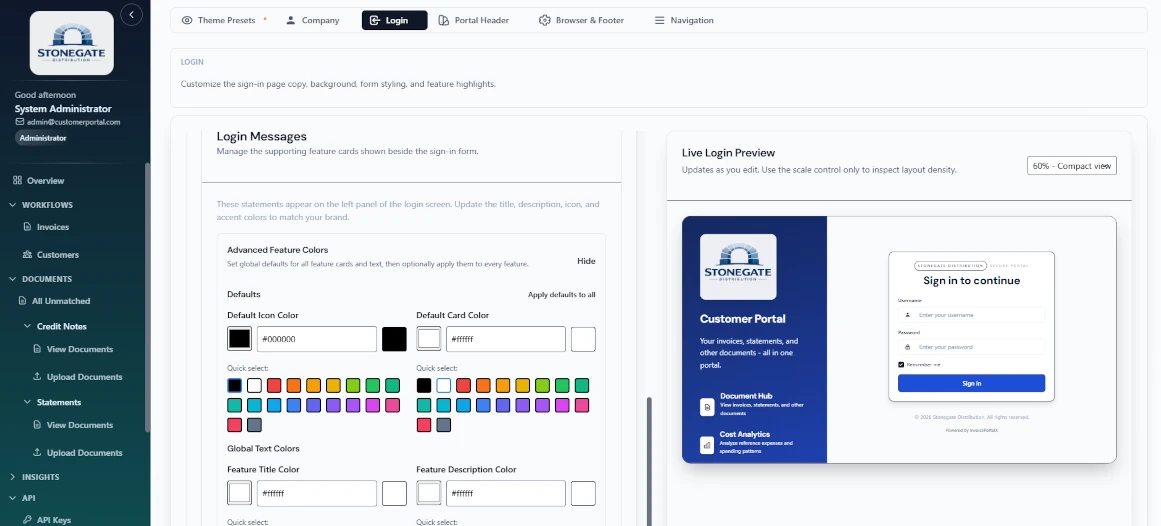
Present customers with a portal that reflects your business identity.
Administration
Review imported information, manage customer access and maintain oversight while the source system remains authoritative.
Common environments
Designed for environments where the ERP, accounting platform or internal back-office system is staying in place but customer access is missing or limited.
System names are examples only. Compatibility depends on the data exports, database access or APIs available in the customer's environment and does not imply an official vendor partnership or native connector.
Explore systems and connection optionsBest-fit use cases
Repeat B2B accounts, established systems and recurring document requests.
Trade accounts, end-of-month reconciliation, invoices, statements, delivery dockets and PODs.
View detailsRepeat buyer accounts needing reliable access to account history and documents.
View detailsParts, machinery and maintenance suppliers with long-running commercial accounts.
View detailsEstablished systems that work internally but have no practical customer-facing layer.
View detailsRecurring contracts, multi-site customers and repeated account or service-document requests.
View detailsGood fit
Not a fit
Security & deployment
The source system stays authoritative. Hosted and self-hosted models are available, with operating responsibilities confirmed for each project.
View security & deploymentCustomer users see only the account information assigned to them.
Customer organisations use isolated deployments with TLS in transit and administrative logging.
Use GX Code-managed hosting or scope a container-based deployment in customer-controlled infrastructure.
Phased rollout
Start with the documents causing the most repeat admin. Add more customers, document types or automation only when there is a business reason.
01 Review
Identify the source system, account structure, common requests and available exports or interfaces.
02 Connect
Use an upload, scheduled file/SFTP, API or another scoped method.
03 Launch
Set branding, access, documents and an initial customer group before wider release.
04 Expand
Introduce more documents, customers or integration depth after the first rollout proves useful.
Commercial model
Every rollout starts with the existing system and the first customer group, so pricing is scoped after review and reflects the actual implementation.
Primary purchase
A fixed project scope covering the selected source data, connection, portal configuration and first customer rollout.
After launch
Ongoing hosted access and standard support for keeping the included portal scope operational.
Optional
Quoted separately when the requirement extends beyond the included portal scope.
No. InvoicePortalX sits beside the ERP, accounting or back-office system you already use. That system remains authoritative, and InvoicePortalX does not write back by default.
Start with the simplest reliable option available: an admin upload, scheduled file delivery or SFTP, an existing API, or another connection designed for the source environment.
The configured scope can include invoices, statements, balances and related account documents supplied by the source system. Each customer user sees only the accounts and information assigned to them.
With hosted deployment, GX Code manages the InvoicePortalX environment described in the project agreement. A self-hosted deployment runs in customer-controlled infrastructure, with responsibilities for infrastructure, certificates, backups, networking, monitoring, upgrades and support defined in the project agreement.
GX Code reviews the source system and account structure, selects a practical connection, configures branding and customer access, and launches an initial customer group.
Pricing is quoted in A$ + GST. The proposal separates the implementation project, ongoing hosted access and any optional integration or custom work.
Timing is confirmed after the source data, connection method and first rollout scope are reviewed. The launch plan then provides a timeframe based on those dependencies.
If the existing portal meets the requirement and is practical to deploy, use it. InvoicePortalX fits when customer self-service is missing, limited or unsuitable for the required rollout.
First rollout
Tell us what customers ask for and where the information lives. GX Code will recommend a practical first scope and connection approach.